note well: The Coms Rolling Encryption & Punchcards is being testmerged as of 11/16/25, some sections may become outdated. Please let me know if you find any errors
If you don't want to convert hexs to decimals and are out of punch cards, you can click on a hexcode then click and drag your mouse up and down to rotate through the different options
The most common problem is forgetting to set the offset on the Encoder
I Just Want the Steps
- You must be at least trained in intel (skill level 1 or above) to use the computers
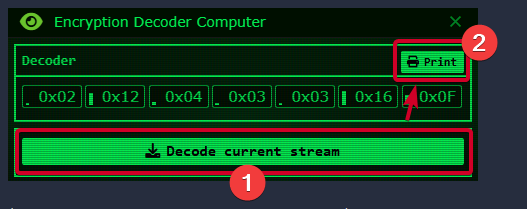
- Click on the Encryption Decoder Computer on the right and “decode current stream”
- Once it is decoded “Print” it on a punch card or manually transfer the data from the Decoder to the Cipher Computer
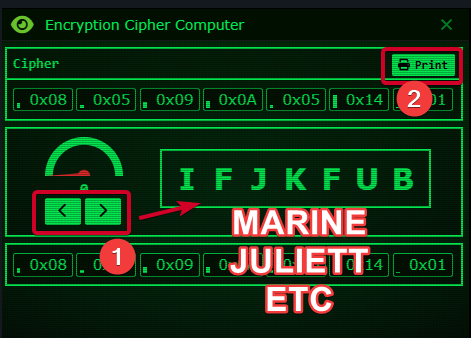
- Insert the punch card into the Encryption Cipher Computer in the middle
- Use the “<” and “>” to cycle through the Offsets until one turns your Challenge Phrase into a real word
- “Print” it on a punch card or manually transfer the data from the Cipher to the Encoder Computer
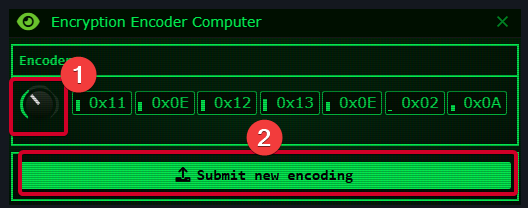
- Insert this second punch card into the Encryption Encoder Computer on the left
- Turn the nob to the Offset from the Encryption Cipher
- “Submit new encoding.” If you “PING” makes a “PONG” you are done, and your announcement clarity has returned to 95%
Common Problems
- Make SURE you set the nob on the Encryption Encoder
- Too much time has passed, and your Challenge Phrase is outdated
- There is a 1/7 chance that one punch on your card will be incorrect. Find the number that is incorrectly a 0 then manually replace it. You can also reprint the punch card if you prefer
How it Works
Once groundside comms go down squad and command announcements will slowly become garbled by 2.5% every 30 seconds. The maximum comms garble is 55%, and the minimum is 5%. CIC can restore comms clarity to 95% by completing a decryptionCurrently to check your announcement clarity use the Encryption Coder Computer (set to your last Decryption) to submit a new encoding. Based on how many letters of “PONG” are still known tells the approximate announcement clarity
| Known Letters of PONG | Announcement Clarity | Minutes Since Last Successful Decryption |
|---|---|---|
| 4 letters | >90% clear | 0-1 minutes |
| 3 letters | >75% clear | 1-4 minutes |
| 2 letters | >60% clear | 4-7 minutes |
| 1 letter | >45% clear | 7-10 minutes |
| 0 letters | 45% clear | 10+ minutes |
It takes 10 minutes for comms clarity to go from its maximum at 95% to its minimum of 45%. When you decode the current stream in the Decoder, you get a one minute grace period. This means you have 2 minutes to decrypt the Challenge Code and still restore the announcement clarity to 95%. The first minute is your grace time and the second minute is the decay from 100 to 95% clarity because the max is only 95%. This means you re-submit your latest decrypted Challenge Phrase one time to quickly restore 5% clarity if you don’t have time to do a full encryption
- It is strongly recommended to do this at least once after briefing while the dropship is on first drop because it will be hard to understand announcements before comms are restored
- If CIC is trying to communicate with survivors, such as FORECON, via announcements you should keep the Challenge Phrase up to date until marines land
- If you need to send a mission critical announcement while comms are down you should restore comms clarity before sending it
- You can update the tacmap every 3 minutes. If comms are down, it is best practice to restore the announcement clarity just as often
Meet the Team
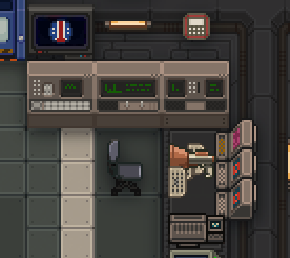
There are three new machines and one new object type in CIC. You need to be trained in intel (skill level 1 or above) to operate them:
List of Crew Who Can Use the Computers
- Commanding Officer
- Executive Officer
- Auxiliary Support Officer
- Chief of Military Police
- Chief Medical Officer
- Staff Officers
- Chief Engineer
- Pilot Officers
- Intelligence Officers
- Quartermaster
- Researchers
- Synthetics
- Senior Enlisted Advisor
- Anyone who has read an intel pamphlet from an Intelligence Kit
-
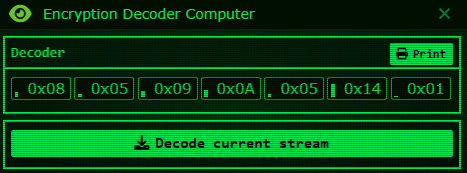
The Encryption Decoder Computer generates an encrypted seven character Challenge Phrase by decoding the current stream. This will be a series of hexcodes that can be printed onto a punch card
(An example encoded Challenge Phrase) -
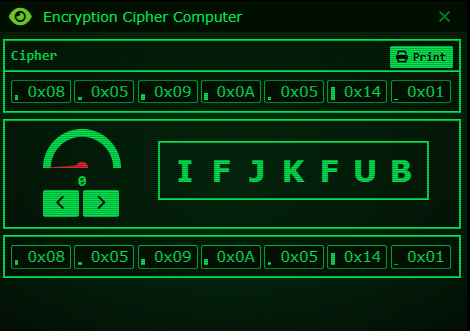
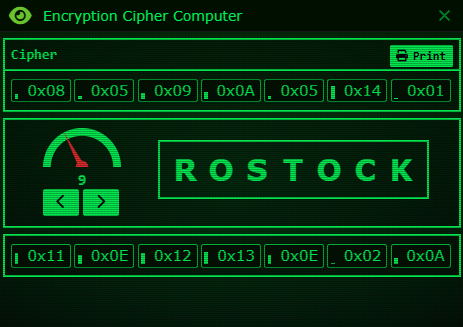
The Encryption Cipher Computer assists you in decoding the Challenge Phrase. You can load the punch card from the Decoder Computer to quickly upload your cipher. To decode the phrase, use the decrease (<) and increase (>) arrows to cycle through the 27 possible Offsets. One of these offsets will turn your garbled mess into a word. Once you find it, print the encoded Challenge Phrase onto a punch card
Current List of Challenge Phrases
WEYLAND
_YUTANI
COMPANY
ALMAYER
GENESIS
SCIENCE
ANDROID
WHISKEY
CHARLIE
FOXTROT
JULIETT
MARINES
TRACTOR
UNIFORM
RAIDERS
ROSETTA
SCANNER
SHADOWS
SHUTTLE
TACHYON
WARSHIP
ROSTOCK
(The Challenge Phrase from the Decoder has been uploaded, but the offset is still unknown)
(An offset of 9 has revealed the Challenge Phrase to be ROSTOCK)
-
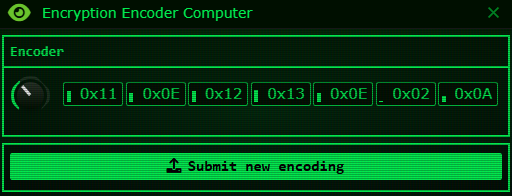
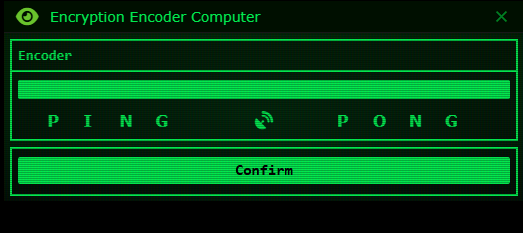
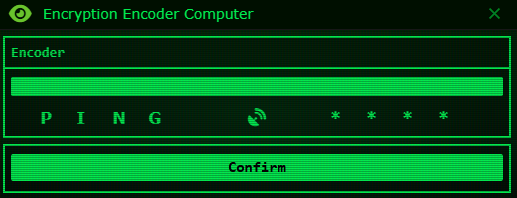
The Encryption Encoder Computer can submit new encodings to restore the announcement clarity during comms outages. Load the new punch card and make sure to turn the nob to the correct offset you found from the Cipher Computer. Finally submit the new encoding, your “PING” should generate a “PONG,” which means the announcement clarity has been restored to 95% un-garbled. The Challenge Phrases are updated every 30 seconds, and each update increases the garble by 2.5%. If you take too long decoding your decrypted Challenge Phrase may be partially (or entirely) out of date. Each missing letter of “PONG” means you have about 10% announcement garble. This computer lets you quickly check roughly how garbled your announcements are from CIC
(Turn nob to the offset from the Cipher Computer, in this case 9)
(A successfully decoded, deciphered, and re-encrypted Challenge Phrase completed in a timely fashion)
(This means your Challenge Phrase is very outdated or incorrect)
-
Punch Cards work like normal paper. The Cipher and Encoder Computer each start loaded with ten punch cards and on the table are four stacks of 5 punch cards each. Two can be loaded into each computer to fill them up to 20 cards each. One of these four cards have basic instructions on how to operate the computers
When printing, cards have a 1/7 chance to have a single mispunched hole
Blank punch cards can spawn on the groundmap along with other intel objects if you run out. There is a 10% chance that a paper scrap spawn point will also have a stack of 5-10 blank punch cards
Possible Problems with Punch Cards
There is a 1/7 chance that printed punch cards have one incorrect punch. This can cause the Encryption Cipher Computer to not make any words or cause the Encryption Encoder Computer to fail without a clear reason. Here is how to read your card and check
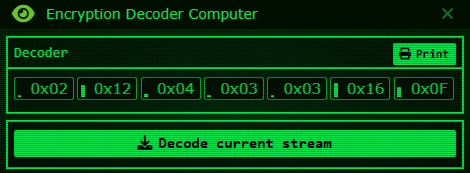
(Example Decoder readout)
(What the printed punch card looks like in-game)
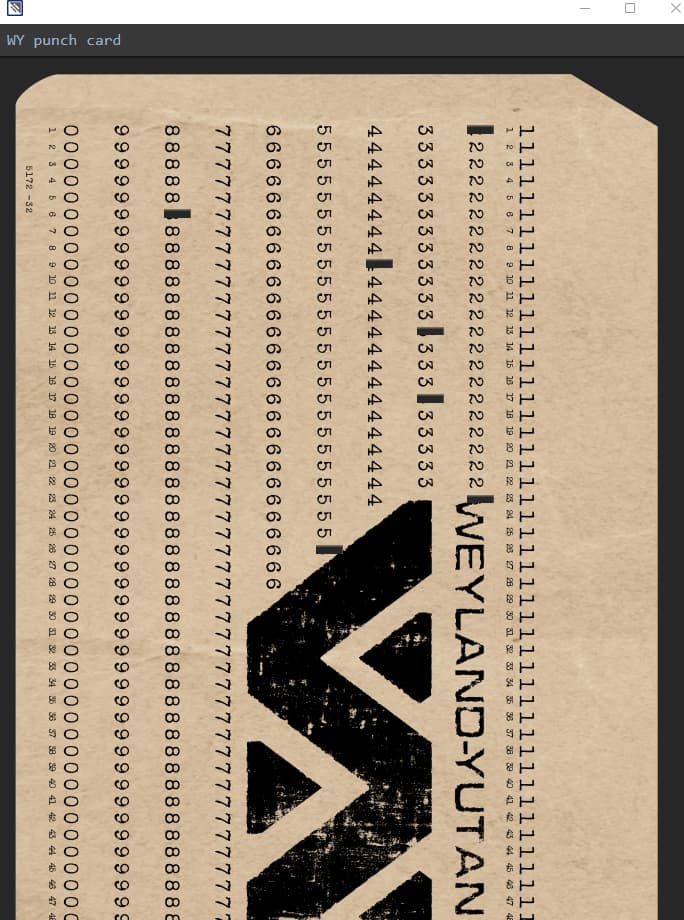
(The same punch card rotated for readability)
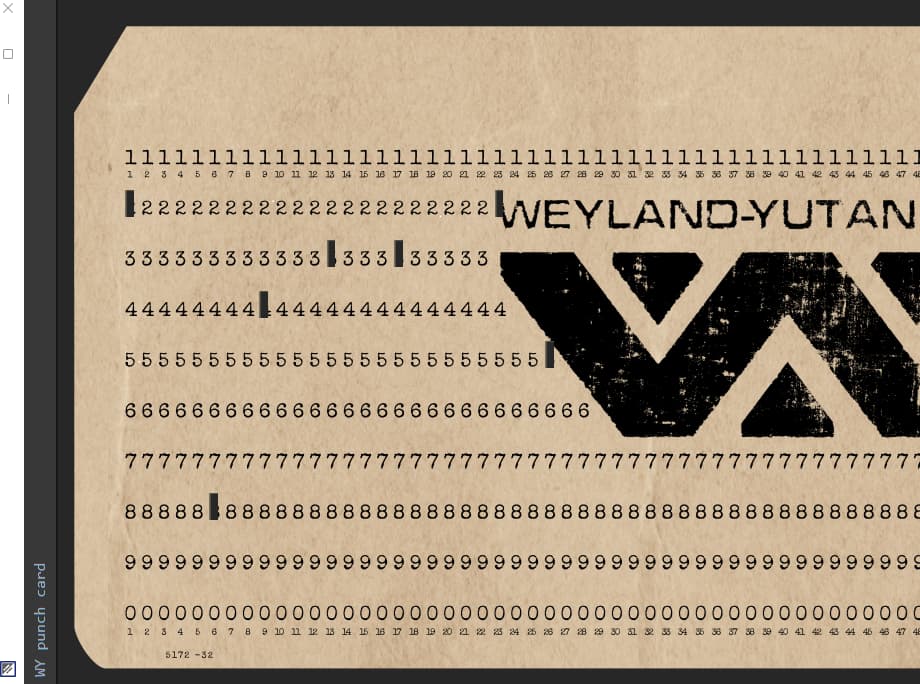
You read from left to right across the card, for the in-game orientation, you read top to bottom. This card reads “2 - 8 - 4 - 3 - 3 - 2 - 5.” These numbers are the last decimal digit of the hexcodes.
| As a Hexcode | 0x02 | 0x12 | 0x04 | 0x03 | 0x03 | 0x16 | 0x0F |
| As a Decimal | 02 | 18 | 04 | 03 | 03 | 22 | 15 |
If the Encryption Cipher Computer makes no complete words, try re-printing the punch or manually converting it
(An example mispunched card inserted into the Encryption Cipher Computer, the Offset of 20 almost makes a word)
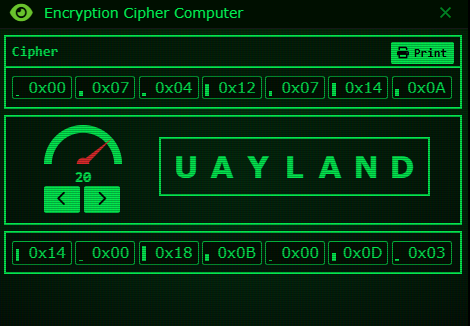
This has UAYLAND instead of WEYLAND. When a letter is mispunched it will always be a 0 in the wrong spot. 0x02 (which should be W) has been logged as 0x00 (which has turned it into a U). Replace 0x00 with 0x02 to fix it
Reading the cards yourself is currently not very useful, but you can use a pen to write in the margins of a card and fax them for role-play purposes
How to Convert the Hexcodes to Decimals
This can be used if you run out of punch cards or if you want to solve it yourself. The computers will display everything in hexcodes. You can click on a hexcode then click and drag your mouse up and down to cycle through all of the hexcodes until you get what you want or you can manually transfer entries by inputting the decimal corresponding with the hexcode you want (you cannot copy and paste from one machine to another you must use click drag or type in the decimal number)A more technical explanation:[1] For 0x10 through 0x1F (or in these computers case they’d only go up to 0x1A), to understand that the 1 in 0x1 A is its own nibble aka half a byte. Same for the A part in 0x1A . This is an important distinction because you just reapply your logic for For decimals 0 to 9 (hexcodes 0x00 to 0x09) and For 10 to 15 (0x0A to 0x0F) to this nibble
Here is a conversion table:
| As a Hexcode | As a Decimal | As a Letter |
|---|---|---|
| 0x00 | 0 | A |
| 0x01 | 1 | B |
| 0x02 | 2 | C |
| 0x03 | 3 | D |
| 0x04 | 4 | E |
| 0x05 | 5 | F |
| 0x06 | 6 | G |
| 0x07 | 7 | H |
| 0x08 | 8 | I |
| 0x09 | 9 | J |
| 0x0A | 10 | K |
| 0x0B | 11 | L |
| 0x0C | 12 | M |
| 0x0D | 13 | N |
| 0x0E | 14 | O |
| 0x0F | 15 | P |
| 0x10 | 16 | Q |
| 0x11 | 17 | R |
| 0x12 | 18 | S |
| 0x13 | 19 | T |
| 0x14 | 20 | U |
| 0x15 | 21 | V |
| 0x16 | 22 | W |
| 0x17 | 23 | X |
| 0x18 | 24 | Y |
| 0x19 | 25 | Z |
| 0x1A | 26 | - |
Copyable Conversion Table for In-Game Papermarkup
[h2]How to Convert a Hex to a Decimal[/h2]
[table][row][cell][b]Hex[cell][b]Decimal
[row][cell]0x00[cell]0
[row][cell]0x01[cell]1
[row][cell]0x02[cell]2
[row][cell]0x03[cell]3
[row][cell]0x04[cell]4
[row][cell]0x05[cell]5
[row][cell]0x06[cell]6
[row][cell]0x07[cell]7
[row][cell]0x08[cell]8
[row][cell]0x09[cell]9
[row][cell]0x0A[cell]10
[row][cell]0x0B[cell]11
[row][cell]0x0C[cell]12
[row][cell]0x0D[cell]13
[row][cell]0x0E[cell]14
[row][cell]0x0F[cell]15
[row][cell]0x10[cell]16
[row][cell]0x11[cell]17
[row][cell]0x12[cell]18
[row][cell]0x13[cell]19
[row][cell]0x14[cell]20
[row][cell]0x15[cell]21
[row][cell]0x16[cell]22
[row][cell]0x17[cell]23
[row][cell]0x18[cell]24
[row][cell]0x19[cell]25
[row][cell]0x1A[cell]26[/table]
It looks like this in-game:
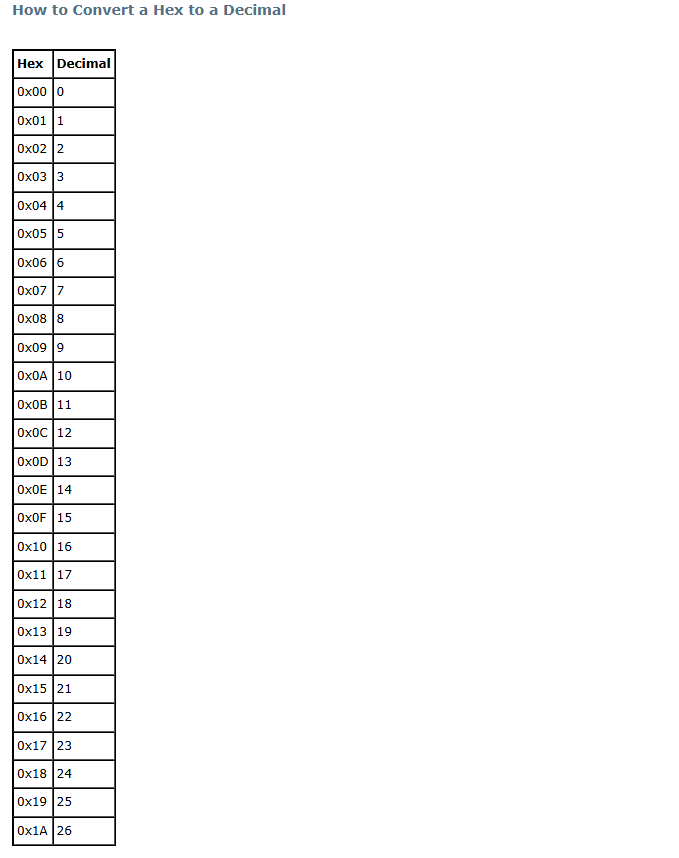
The decimal which are in base 10 while the hexadecimals are in base 16
| Base 10 (Decimals) | Base 16 (Hexadecimals) |
|---|---|
| 0 | 0 |
| 1 | 1 |
| 2 | 2 |
| 3 | 3 |
| 4 | 4 |
| 5 | 5 |
| 6 | 6 |
| 7 | 7 |
| 8 | 8 |
| 9 | 9 |
| A | |
| B | |
| C | |
| D | |
| E | |
| F | |
| Here the second digit is added, going from “ones” to “teens” | |
| 10 | 10 |
| 11 | 11 |
| 12 | 12 |
| 13 | 13 |
| 14 | 14 |
| 15 | 15 |
| 16 | 16 |
| 17 | 17 |
| 18 | 18 |
| 19 | 19 |
| This is currently the largest used hex → | 1A |
| 1B | |
| 1C | |
| 1D | |
| 1E | |
| 1F | |
| After “teens” come “twenties” | |
| 20 | 20 |
| … | … |
Some tips I use to convert a hex to a decimal:
- For decimals 0 to 9 (hexcodes 0x00 to 0x09) copy the last digit
Decimal 0 relates with hex 0, 1 with 1, 2 with 2, etc - For 10 to 15 (0x0A to 0x0F) add 9 to the number of the alphabet that the letter is
Decimals do not have A, B, C, D, and F digits, so hex A relates to decimal 10, B to 11, C to 12, etc - For 16 to 25 (0x10 to 0x19) add 6 to the number after the lowercase “x”
After hex F comes 10, because hexes have 6 extra digits, hex 10 relates with decimal 16, 11 with 17, 12 with 18, etc - For 26 (0x1A) follow the same tips in #2
This pattern repeats. After hex 19 is 1A. This means hex 1A relates with decimal 26. Currently this is the largest used hex
Edits:
11/16/25: Added more clarity and corrected some errors. A special thanks to Drathek and Hades for their invaluable help 
11/25/25: Fixes the in-game printable converter
A huge thanks to Drathek for this! ↩︎